
Another big day for Steam Deck owners, as SteamOS 3.5 has arrived with a slew of new features. Valve also released a new Steam Client update
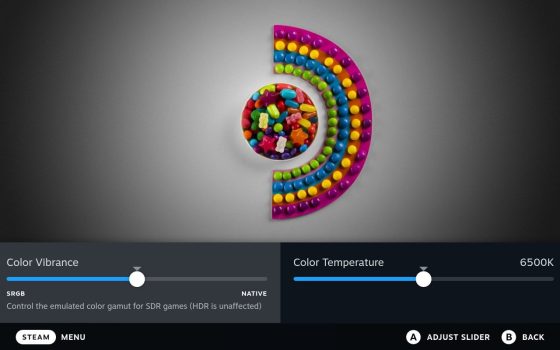
SteamOS 3.5 introduces official support for the new Steam Deck OLED, as well as changes to the default color rendering for the Steam Deck LCD to emulate the sRGB color gamut, resulting in warmer and more vibrant colors. Although, in the new display settings, you can change this at any time.
You will now also have:
- External display HDR settings.
- External displays can have VRR enabled.
- Fixed an issue in which certain workloads displayed severe CPU performance issues unless SMT was manually disabled.
- External drives are automatically mounted.
- Bluetooth connection stability has been improved, especially when using multiple controllers.
- Graphics drivers have been upgraded, with numerous performance and compatibility improvements.
- Arch Linux package base has been updated.
- KDE Plasma desktop has been upgraded to 5.27, among other things.
Full SteamOS 3.5.5 changelog here.
Regarding the Steam Client update, it incorporates some new features from various Beta versions for both Desktop and Steam Deck. This comprises:
This update has been re-released with the following fix:
- Fixed video freeze when streaming games with launchers when using NVIDIA hardware encoding
General:
- Allow local game content transfers from a plugged-in Steam Deck to other Steam clients on the same LAN.
- Fixed setting the correct AppID in Source SDK mod manager.
- Visual tweaks to Steam Deck, Big Picture Mode and SteamVR: Many small changes throughout to make the user interface a more visually-rich experience in Home, Library and other areas.
- Nicer layout for Soundtracks pages. These pages are now easier to navigate in Big Picture Mode and feature larger artwork on Desktop.
- Fixed some layout and interaction bugs in the Media viewer.
- Move the controller support information in the desktop client from the play bar to a widget in the right column
- Add HDR badge to app details for games that are marked as having HDR output.
- Fix bug preventing you from launching a game that had temporarily disabled auto-updates if new workshop content was available
- Additional information about controller support has been added to the client:
- Game details pages in the library will now show information about specific controller and VR support in the right-hand column when devices are connected
- PlayStation controllers have a new default mode in Steam Input where Steam will route controllers to the game’s built-in support if available and to Steam Input when they would be unsupported. These controllers can still be globally opted-in or out of Steam Input in the controller tab of the Steam settings page
- The landing page of the controller configurator now has controller support information, and it has been made easier to quickly opt in or out of Steam Input for a particular game
- In the Big Picture library, there is now Xbox/DualShock/DualSense support tabs similar to the “Great on Deck” tab that are populated based on your connected devices
- DualShock, DualSense, and Steam Input API support have been added to the available filters in the library
- Games that require controllers (no mouse/keyboard support), require a VR Headset, or support both VR and standard game modes will now show that information in the client, similar to how it displayed in the store.
- Footer icons for DualSense controllers in Big Picture have been updated to use the black and white style on the device
Remote Play:
- Fixed hidden mouse cursor when streaming to Android TV
- Fixed stream lockup when using Intel iGPU hardware encoding
Steam Input:
- Improve the look of the configurator when there are no controllers connected
- In games that support SteamInput API Actions, we no longer hide the Flick Stick as Mouse option if a FlickStick action is defined – this is so that Gyro To Mouse can be properly complemented if you wish.
- Fixed the ROG Pugio II mouse showing up as a controller
- Fix Gyro Joystick mode: Core gyro quaternion is updated even when the app requesting it is not focused.
- Fixes to both Gyro as Joystick Modes: Min/Max remapping was not allowing values to become zero when gyro values were less than the minimum required joystick output values.
- Gyro to Joystick (Deflection) mode uses a sensor fusion controller accelerometer rather than quaternion for more consistent behavior. This should address issues where the X output would become canted in the legacy modes. Note: it may feel subtly different. Feedback welcome.